|
|
|
|||
|
Home | Troubleshooting | Quick Setup | Cisco How to | Data Recovery | Forums | Blog | IT Exam Practice | Services | About Us | Chicagotech MVP | Search | Contact Us | |
|
How to use the CRM40IFDTool
-
Step by step with Screenshots
1.
Download the CRM4IFDTool from this link:
http://support.microsoft.com/kb/948779
2.
Extract and copy the CRM4IFDTool to the
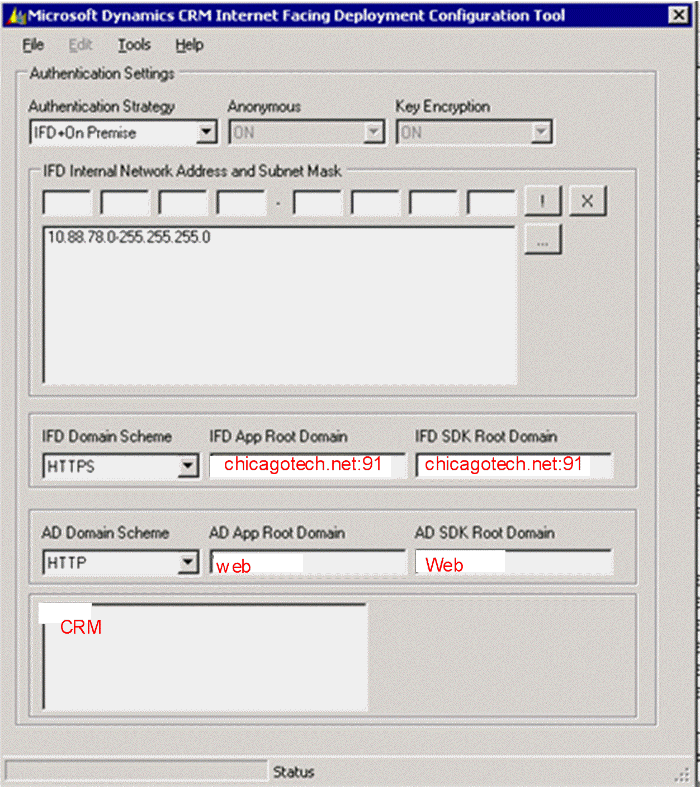
following directory: 3. Open the CRM4IFDTool.exe tool. 4. Click the Authentication Strategy list and click IFD+On Premise. Then enter your LAN IP range as shown below. 5. In the IFD Domain Scheme for external access and AD Domain Scheme for internal access information. 6. Click File, and then click Apply Changes. Note: You must have correct DNS to point to the CRM server.
Post your questions, comments, feedbacks and suggestions Related Topics
|
|
|
This web is provided "AS IS" with no warranties.
Copyright © 2002-2018
ChicagoTech.net,
All rights reserved. Unauthorized reproduction forbidden.