|
iSCSI How to
Advantages of iSCSI
Another alternative solution for iSCSI Storage
check the version of the Microsoft iSCSI Software initiator
Configure BindPersistentVolumes for iSCSI Initiator
How to add a connect to target in iSCSI
How to configure persistent logons to the target
How to configure shared ISCSI SAN storage on Windows 2008
How to configure Multi-Path iSCSI I/O on Windows 2012 R2 - Step by step with screenshots
How to disable to logoff SAN volume in iSCSI
How to dismount the iSCSI volume on Windows 2003 How to enable iSCSI to access SAN
How to get all the cmdlet for iSCSI Target?
How to modify Settings in EqaulLogic SAN
How
to move iSCSI volume from one server to another - Step by step with screenshots
How to remove an iSCSI target on Windows 2003
How to remove iSCSI volume from Windows Server 2003 - Step by step with screenshots
How to remove iSCSI volume from Windows Server 2012 R2 - Step by step with screenshots
Setup Server service dependent on iSCSI Initiator service
What do I need when configuring an iSCSI Cluster
Which OS is iSCSI supported with cluster server and How many
How to enable iSCSI to access SAN
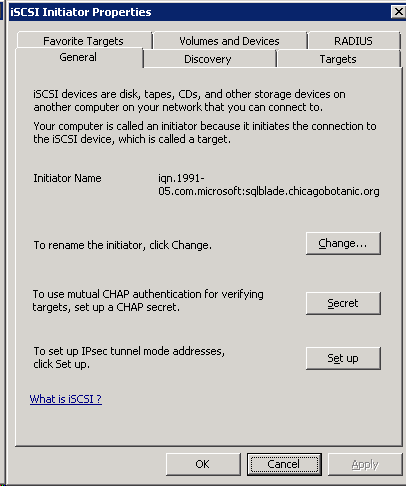
1. Open iSCSI and click on the
Discovery Tab
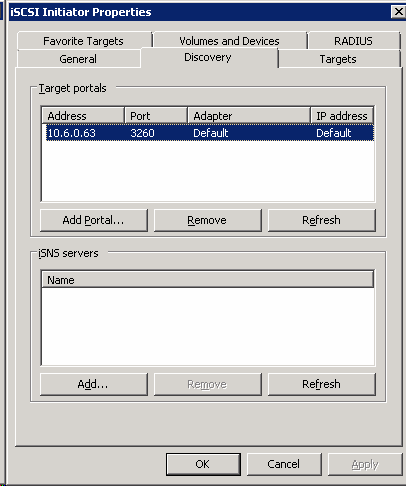
2. Click Add under Target Portals
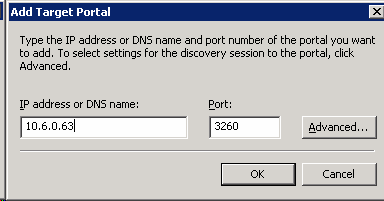
3. Enter the IP address of the SAN. By default, the port #
is 3260.
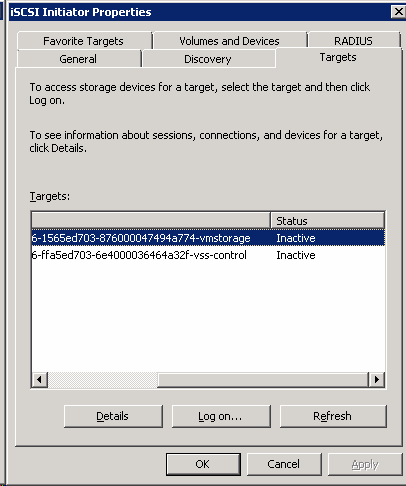
4. Click on the Target tab.
Highlight the first entry and then click Log On. Make sure this is
the storage you want to use (in our case it is vmstorage).
5.
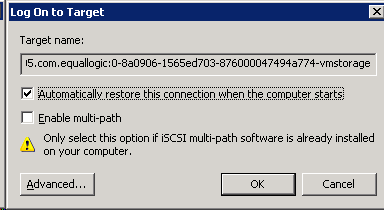
In the Target Name,
click on “Automatically restore this connection when the systems
boots”. Then click OK.
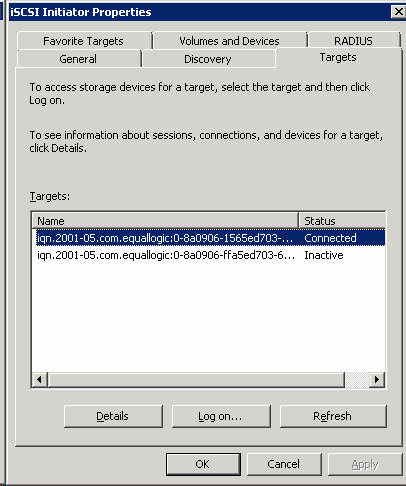
6. The Target name status should change to connected.
7. Close iSCSI, you should have SAN's volume display
in the Disk Management.
Post your questions, comments, feedbacks and suggestions
Contact a consultant
Related Topics
|